This page details how to initiate a Data Quality Profile of your CRM Data. This will allow you to discover your CRM pitfalls so that you can apply data cleansing rules. Or, understand your data set so that you can optimise your matching rules and transformations.
To access the Data Profiling homepage, navigate to Settings and then select Data Profiling:

This will bring you to the Data Profiling home screen. From here, select New Profile Report to create a new profile report.

This will direct you to the following screen:

Within this screen, you will be able to set the name and the parameters for your profiling session.
- Profile Session Name - Enter the name you wish to give this report.
- Select Entity - Select the entity in which you wish to profile (Contact, Account, Lead etc.)
- View Type - Select whether you wish to profile All Records, a Personal view, a System view or a Shared view.
- View - Select the view that you would like to profile. This view will have your filters required and the columns (fields) that you would like to profile i.e. first name, last name, email, mobile phone, address fields, etc.
Data Profiling Report
After the data profile has been completed, you can view your Data Profiling Report by selecting the 3 dots under the actions header and then selecting Review.

This will open your Data Profiling Report in a new window and appear as follows:
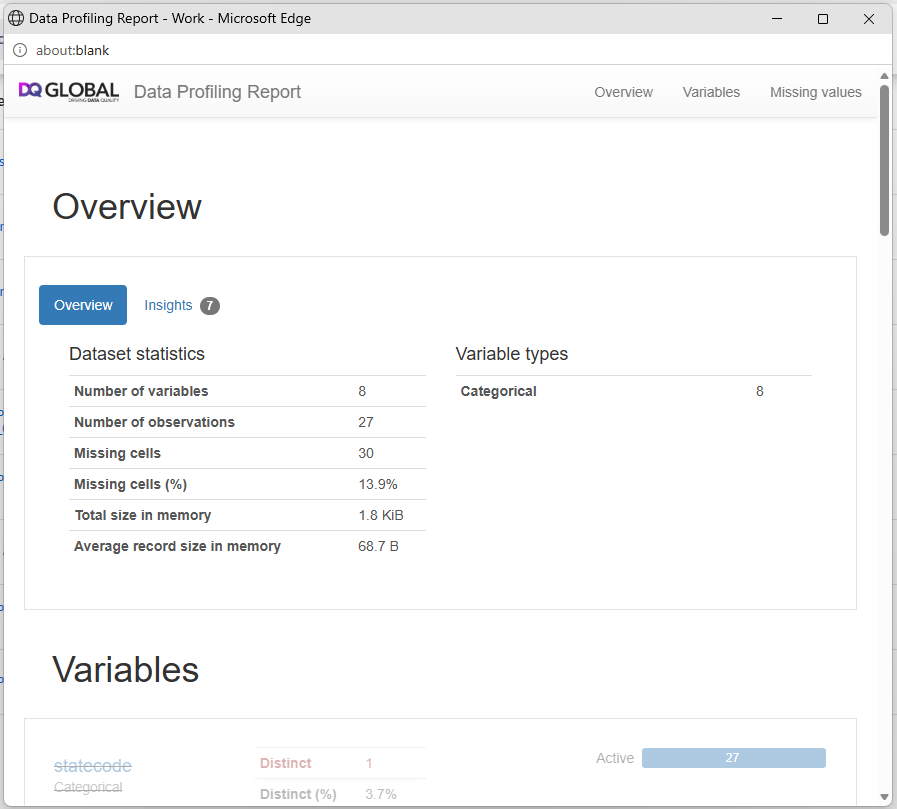
The Data Profiling Report will assess every data field that is present in the selected view you have created within MS Dynamics 365 CRM and provide a range of different insights including Distinct (%), Missing (%), Min/Max length etc.
The "Overview" tab is a breakdown of the dataset statistics.
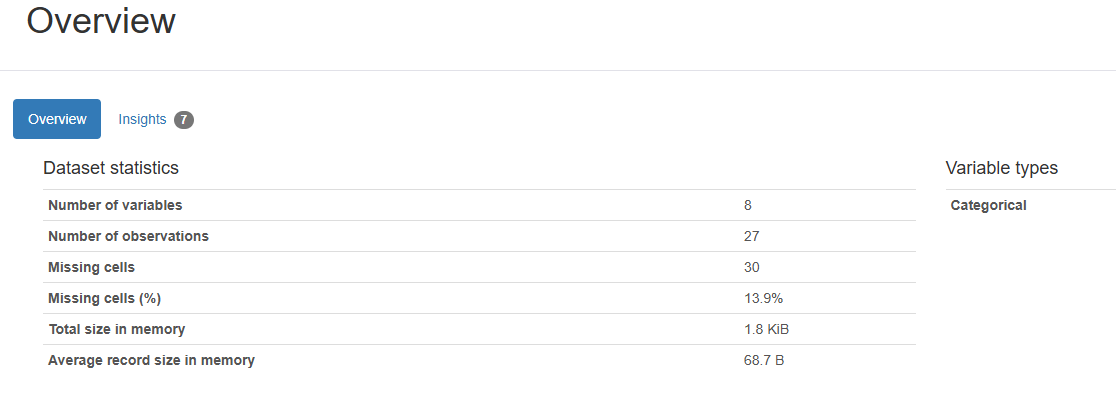 The main items here are:
| Statistic | Value | Definition |
| Number of variables | 8 | The dataset contains 8 columns/fields. For example: First Name, Last Name, Email, Company, City, etc. |
| Number of observations | 27 | The dataset contains 27 records (rows). Each row represents one observation, record, or entity. |
| Missing cells | 30 | There are 30 empty values across the entire dataset. These could be blank fields, null values, or missing information. |
| Missing cells (%) | 13.9% | Of all possible cells in the dataset, 13.9% are empty. |
| Total size in memory | 1.8 KiB | The dataset occupies approximately 1.8 kilobytes of RAM when loaded. This is very small. |
| Average record size in memory | 68.7 B | Each row uses about 68.7 B of memory on average. |
| Variable types | Categorical | All 8 columns have been interpreted as categorical/text values rather than numbers, dates, or continuous measures. |
This “Insights” tab is flagging the main things the profiler noticed about your dataset, especially fields that are constant, missing, or unique. It tells you which columns may or may not be useful for analysis, matching, or data quality checks.
In our example:
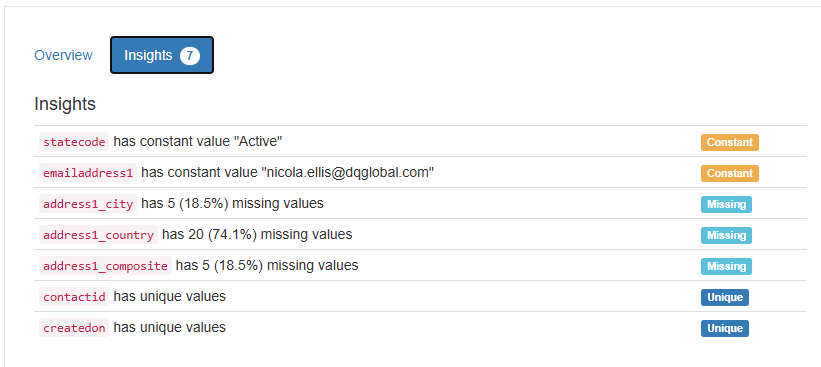
Here is what each of the above insights means:
| Insight | What it means | Why it matters |
|---|---|---|
statecode has constant value "Active" | Every record in this dataset has the same value in the statecode field: Active. | This field does not help you distinguish between records because there is no variation. It may still be useful as a filter, but not useful for matching or profiling differences. |
emailaddress1 has constant value "nicola.ellis@dqglobal.com" | Every record has exactly the same email address value. | This is important. If this is real client/contact data, it suggests the email field may have been populated incorrectly, defaulted, or used as test data. For deduplication/matching, this field would be misleading because it would make unrelated records look like they share the same email. |
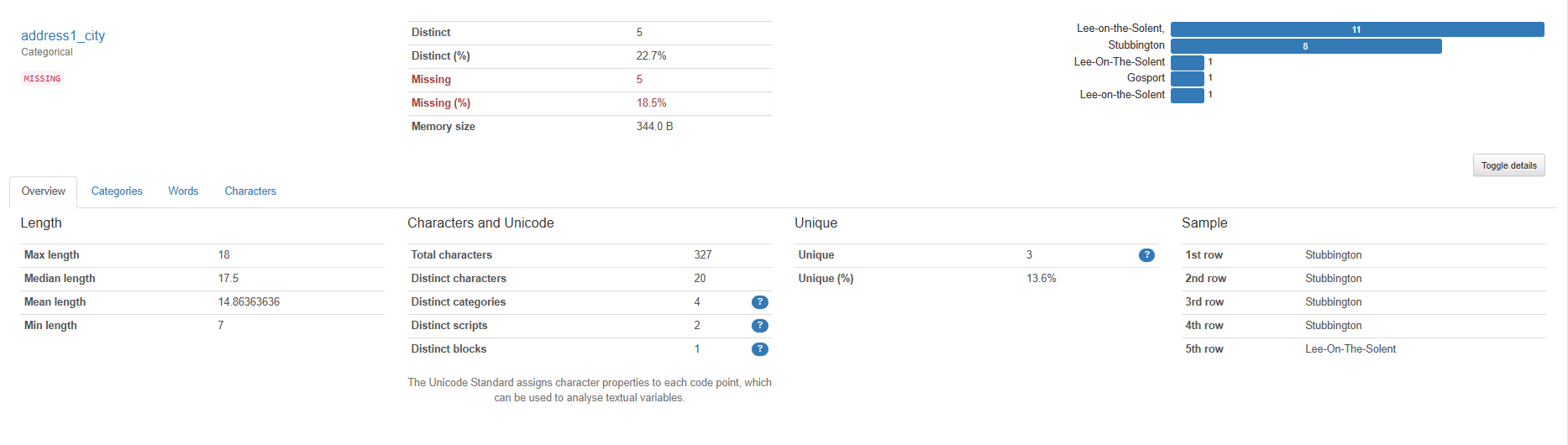
address1_city has 5 (18.5%) missing values | 5 out of 27 records do not have a city populated. | This is a moderate completeness issue. If city is used in matching, segmentation, territory assignment, or address validation, those 5 records may be less reliable. |
address1_country has 20 (74.1%) missing values | 20 out of 27 records do not have a country populated. | This is a significant completeness issue. Most records are missing country, so this field is currently weak for location-based matching, filtering, reporting, or validation. |
address1_composite has 5 (18.5%) missing values | 5 out of 27 records do not have the combined/full address field populated. | This suggests some records have incomplete address data. The composite address field is often built from other address fields, so missing values here may mean one or more address components are missing. |
contactid has unique values | Every record has a different contactid. | This is expected if contactid is the CRM/system unique identifier. It is useful for identifying each individual record, but not useful for finding duplicates because duplicates usually have different IDs. |
createdon has unique values | Every record has a different created date/time. | This means each record was created at a unique timestamp. It can help with auditing or understanding record history, but it is not usually useful as a matching field. |
Here is what each of the labels means:
Constant
A "constant" field has the same value across all records.
In our example report:
- statecode is always Active
- emailaddress1 is always nicola.ellis@dqglobal.com
From a data quality perspective, constant fields can be useful context, but they are usually poor matching fields because they do not help separate one record from another.
The email one is the bigger concern in our example because the email address is normally expected to vary across contact records.
Missing
A "missing" field means some records have blanks/null values.
In our example report:
- address1_city is missing on 5 records
- address1_country is missing on 20 records
- address1_composite is missing on 5 records
In country field is the biggest concern in our example because 74.1% missing means only 7 of the 27 records have a country value populated.
Unique
A "unique" field means every row has a different value.
In our example report:
- contactid is unique
- createdon is unique
This is not necessarily a problem. For example, contactid should usually be unique because it is the record's system ID. However, unique fields are not always useful for deduplication. If two duplicate contacts exist in CRM, they will still usually have different contactid values.
In this dataset example, the main takeaways are:
1. The email field looks suspicious:
- If every contact has nicola.ellis@dqglobal.com, that likely means the email address has been defaulted, incorrectly mapped, or used as a placeholder/test data.
- The emailaddress1 would be best used in tandem with another field for matching and scoring.
2. Country completeness is poor:
- address1_country is missing on 74.1% of records.
- If location is important, then this field needs review or enrichment.
3. City and composite address are partially incomplete:
- Both have 18.5% missing, which is still worth cleaning if address matching matters.
4. contactid being unique is expected:
- This confirms each row is a separate CRM contact record.
- It does not mean each person is unique.
5. createdon being unique is normal:
- This means that each record was created at a different time. The main reason you will see records with the exact same date/time is normally due to importing of data.
This data profiling example could be summarised as:
The dataset has 27 contact records and 8 fields. The key concerns are that the email address field contains the same value across all records, and the country field is missing for most records. The Contact ID and Created On date are unique, which is expected, but they are not useful indicators of whether the underlying contact records are duplicates.
Below is an example of how the fullname field is assessed:
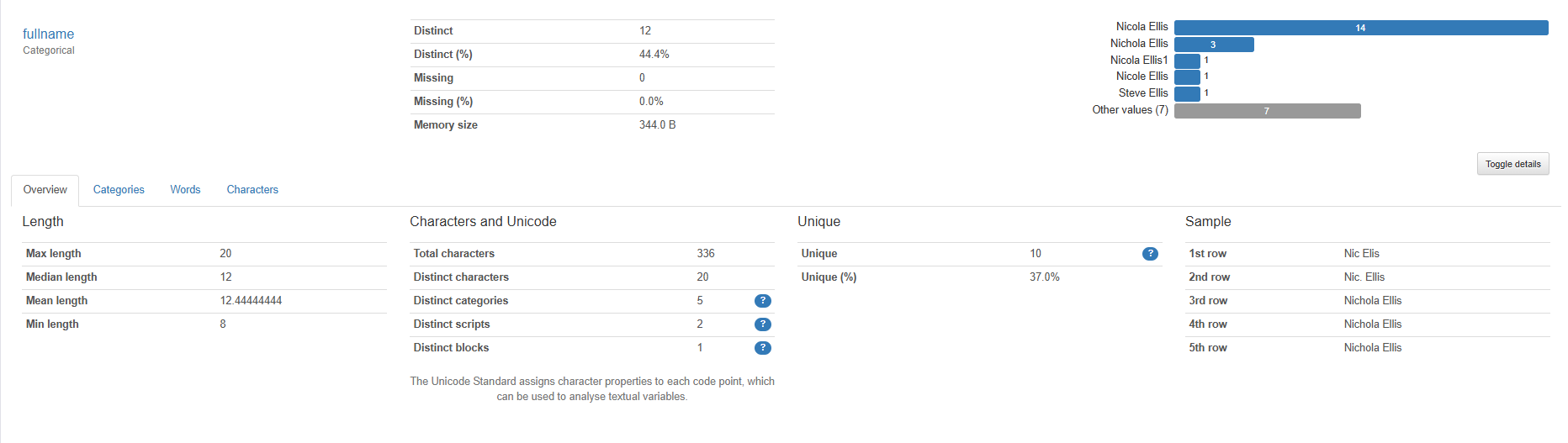
From this we can easily identify that there are 14 Nicola Ellis in this dataset, which are potential duplicates.
Another example is reviewing the address1_city field, we can easily see that in this dataset there are 5 records that are missing content:
 Again, this will allow you to discover your CRM pitfalls so that you can apply data cleansing rules. Or, understand your data set so that you can optimise your matching rules and transformations.
Was this article helpful?
That’s Great!
Thank you for your feedback
Sorry! We couldn't be helpful
Thank you for your feedback
Feedback sent
We appreciate your effort and will try to fix the article