This guide describes the capabilities of the Transform function within DQ for Dynamics™.
Guide contents:
Transform functions enable the User to Abbreviate, Elaborate, Exclude and Normalise data in order to broaden the net and identify duplicates with more accuracy.
DQ for Dynamics™ utilises a variety of transformation libraries, some of which include: Business, Countries, First Names and Addressing.
For example, by using Abbreviate with Country, we can transform United Kingdom to UK.
The Transform function is compatible with 5 different spoken languages.
The screen below allows you to configure transform parameters for ‘Transform Words’:
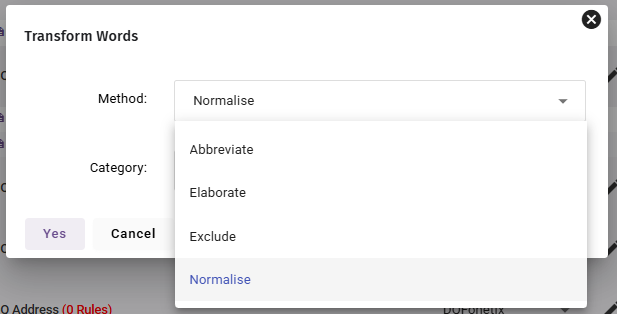
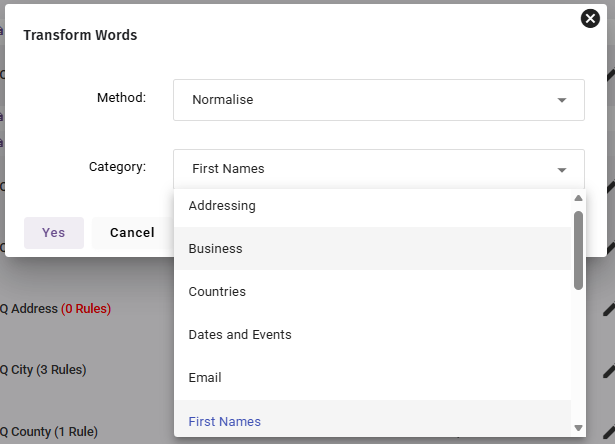
1. Transform Methods
Abbreviate
Allows you to transform (shorten) the structure of your data to ensure a consistent format.
For example you can choose to Abbreviate business elements in a company name field. This will reduce 'Limited' to 'Ltd', 'Group' to 'Grp', 'Incorporated' to 'Inc' etc. and write the results directly back to the field you select in your data set.
Examples:
| Category | Example |
|---|---|
| Addressing | 'Road' to 'Rd', 'Avenue' to 'Ave' |
| Business | 'Limited' to 'Ltd', 'Company' to 'Co' |
| Countries | 'United Kingdom' to 'UK', 'New Zealand' to 'NZ' |
| Dates and Events | 'January' to 'Jan', 'Monday' to 'Mon' |
| First Names | 'Robert' to 'Bob', 'Anthony' to 'Tony' |
| Job Titles | 'Manager' to 'Mgr', 'Colonel' to 'Col' |
| Miscellaneous | 'Object' to 'Obj' |
| Numbering | 'Twenty' to '20', 'Nine' to '9' |
| Qualifications | 'Bachelor of Science' to 'BSc', Doctor of Philosophy to ‘Phd’ |
| Salutations | 'Doctor to Dr', 'Mister' to 'Mr' |
| Weights and Measures | 'Ounces' to 'Oz' |
Elaborate
Allows you to transform (lengthen) the structure of your data to ensure a consistent format.
For example you can choose to elaborate business elements in a company name field. This will expand 'Ltd' to 'Limited', 'Grp' to 'Group', 'Inc.' to 'Incorporated' etc. and write the results directly back to the attribute selected in your data set.
As with all rules there are times when you would not wish to use this rule. For example in a First Name field it would be very dangerous to elaborate your data. Pete would go to Peter, Bob to Robert etc. but you cannot define what Sam would go to e.g. Samuel or Samantha, so Sam would be left the same. However, if there were a Rob in your database that is short for Robin this would also be transformed to Robert.
Examples:
| Category | Example |
|---|---|
| Addressing | 'Rd' to 'Road', 'Ave' to 'Avenue' |
| Business | 'Ltd' to 'Limited', 'Co' to 'Company' |
| Countries | 'UK' to 'United Kingdom', 'NZ' to 'New Zealand' |
| Dates and Events | 'Jan' to 'January', 'Mon' to 'Monday' |
| First Names | 'Bob' to 'Robert', 'Tony' to 'Anthony' |
| Job Titles | 'Mgr' to 'Manager', 'Col' to 'Colonel' |
| Miscellaneous | 'Obj' to 'Object' |
| Numbering | '9' to 'Nine', '20' to 'Twenty' |
| Qualifications | ‘Bsc’ to Bachelor of Science, ‘Phd’ to Doctor of Philosophy |
| Salutations | 'Dr' to 'Doctor', 'Mr' to 'Mister' |
| Weights and Measures | 'Oz' to 'Ounces' |
Exclude
Allows you to transform the structure of your data, by removing certain to ensure a consistent format when DQ for Dynamics looks at your data (Data Matching Mode).
For example, you can choose to exclude business elements in a company name field. This will remove 'Ltd', 'Limited', 'Grp', 'Group', 'Inc', 'Incorporated' etc.
Best used during the matching process as it enables Perfect & Merge to look at the core element of the Company Name to provide a match. E.g. Perfect & MergeLtd. will match with Perfect & MergePlc.
Examples:
| Category | Example |
|---|---|
| Addressing | Exclude text such as 'Road“ and “Rd' |
| Business | Exclude text such as 'Ltd' and 'Limited' |
| Countries | Exclude text such as 'UK' and 'USA' |
| Dates and Events | Exclude text such as 'Mon' and 'January' |
| First Names | Exclude text such as 'Andi' and 'Robert' |
| Job Titles | Exclude text such as 'Mgr' and 'Manager' |
| Miscellaneous | Exclude text such as 'Obj' and 'Object' |
| Numbering | Exclude text such as '100' and 'Hundred' |
| Qualifications | Exclude text such as 'BA' and 'BSc' |
| Salutations | Exclude text such as 'Mr' and 'Dr' |
| Weights and Measures | Exclude text such as 'Oz' and 'Ounces' |
Normalise
Allows you to transform the structure of your data to ensure a consistent format when DQ for Dynamics looks at your data (Data Matching Mode).
For example: You can choose to Normalise business elements in a company name field. This will reduce 'Limited' to 'Ltd', 'Group' to 'Grp', 'Incorporated' to 'Inc.' etc. and write the results directly back to the field you select in your data set.
As with all rules there are times when you would not wish to use this rule. For example in a Forename field it would be very dangerous to Normalise your data. Peter would go to Pete, Robert to Bob, even Rob to Bob etc. you cannot define which of the following names, Samuel or Samantha, as both would be normalised to Sam. However, if there were a Rob in your database that is short for Robin, this would be normalised to Bob.
Examples:
| Category | Example |
|---|---|
| Addressing | 'Garden', 'Garden', 'Gdns' to 'GDN' |
| Business | 'Company', 'Comp' to 'CO' |
| Countries | 'United Kingdom', 'Great Britain', 'GBR' to 'GB'' |
| Dates and Events | 'January' to 'Jan', 'Monday' to 'Mon' |
| 'sales+CRM@dqglobal.com' to 'sales@dqglobal.com' | |
| First Names | 'Andrew', 'Andrea', 'Andres' to 'Andi' |
| Job Titles | 'Engineer', 'Engr' to 'ENG' |
| Miscellaneous | 'Cheque', 'Check' to 'Chq' |
| Numbering | 'Nought', 'Null', 'Nil' to '0' |
| Post Code | 'po13-9fu', 'po13-9fu', 'po139fu', 'PO139FU' to 'PO13 9FU' |
| Qualifications | 'Dr of Philosophy', 'DPhil' to 'PhD' |
| Salutations | 'Mrs', 'Ms', 'Madam' to 'MRS' |
| Telephone | '02392 988303', '0044 2392 988303', '(02392) 988303', '02392-988-303' to '+44 2392 988303' |
| URL | 'www.dqglobal.com', 'dqglobal.com', 'http.dqglobal.com' to 'https//:www.dqglobal.com' |
| Weights and Measures | 'Inches', 'Inch', 'Ins' to 'IN' |
2. Transform Categories
Addressing
The Addressing category is used on address fields, usually Address Line 1 and Address Line 2.
This category understands the most common elements of address data. For example 'Gnds' is an abbreviation for 'Gardens', 'Rd' is 'Road', 'Av' is 'Avenue' etc.
Using this function 15 Hound Terrace will match 15 Hound Street. This would not match if you use the Normalise transformation, however, 15 Hound St. will match 15 Hound Street.
Again this is potentially dangerous if selected as a match field on its own, but when this address field is accompanied by a match criteria which is defined on Postcode as well, it becomes a lot more accurate.
See the example below to better understand how this record is definitely a match, however, some addressing elements have been incorrectly captured during data input.
| Postcode | PO16 8UT | PO16 8UT |
|---|---|---|
| Address Line 2 | 15 Hound Terrace | 15 Hound Street |
| Record Structure | Master Record | Duplicate Record |
| Contact Name | Mr Robert Dickson | Bob Dixon |
| Job Title | Marketing Manager | Mkt Mgr |
| Company Name | Fictitious Ltd | Fictitious Plc |
| Address Line 1 | The New Stables | |
| Address Line 3 | ||
| Town | Fareham | Fareham |
| County | Hampshire | Hants |
| Country | United Kingdom | UK |
| Telephone | +44 23 9298 8303 | 02392 988303 |
| URL | www.dqglobal.com | https://www.dqglobal.com |
Business
The Business category is used on company name fields.
This category understands the most common elements of business name data. For example 'Ltd' is an abbreviation for 'Limited', 'Plc' is 'Public Limited Company', 'Grp' is 'Group' etc.
Best used during the Data Matching process using the Exclude Transformation to ensure that the matching process focuses on the core part of the company name. E.g. using this function 'Fictitious Ltd' will match 'Fictitious Plc' This would not match if you use Normalise however 'Fictitious Ltd' will match 'Fictitious Limited'
Again, this is potentially dangerous if selected as a match field on its own, but when this address field is accompanied by a match defined on address elements as well, it becomes a lot more accurate.
See the example below to better understand how this record is definitely a match. You can see the business names have matched on the main 'Fictitious', but have also matched on the 'addressing' elements, ie., Postcode.
| Company Name | Fictitious Ltd | Fictitious Plc |
|---|---|---|
| Record Structure | Master Record | Duplicate Record |
| Contact Name | Mr Robert Dickson | Bob Dixon |
| Job Title | Marketing Manager | Mkt Mgr |
| Address Line 1 | The New Stables | |
| Address Line 2 | 15 Hound Terrace | 15 Hound Street |
| Address Line 3 | ||
| Town | Fareham | Fareham |
| County | Hampshire | Hants |
| Post Code | PO16 8UT | PO16 8UT |
| Country | United Kingdom | UK |
| Telephone | +44 23 9298 8303 | 02392 988303 |
| URL | www.dqglobal.com | https://www.dqglobal.com |
Countries
The Countries category is used on an address field that contains the information about which country that record relates to.
This category understands most common styles of Country data. For example 'UK' is an abbreviation for 'United Kingdom', 'USA' is 'United States of America', 'De' is 'Germany' etc.
Best used during the Data Matching process using the Normalise Transformation to ensure that the matching process standardises the format of the Country in the data set.
E.g. using this function 'United Kingdom' will match 'UK'.
| Country | United Kingdom | UK |
|---|---|---|
| Record Structure | Master Record | Duplicate Record |
| Contact Name | Mr Robert Dickson | Bob Dixon |
| Job Title | Marketing Manager | Mkt Mgr |
| Company Name | Fictitious Ltd | Fictitious Plc |
| Address Line 1 | The New Stables | |
| Address Line 2 | 15 Hound Terrace | 15 Hound Street |
| Address Line 3 | ||
| Town | Fareham | Fareham |
| County | Hampshire | Hants |
| Postcode | PO16 8UT | PO16 8UT |
| Telephone | +44 23 9298 8303 | 02392 988303 |
| URL | www.dqglobal.com | https://www.dqglobal.com |
Dates and Events
The Dates/Events category would only be used when your data set contains date information that you wish to match on.
This category understands most common styles that a date can be written in. For example 'Jan' is an abbreviation for 'January', 'Feb' is 'February', 'Mon' is 'Monday' etc.
Best used during the Data Matching process using the Normalise Transformation to ensure that the matching process standardises the format of the date field.
The Email category is used on an email field that contains a domain address which the record relates to.
This category understands most common styles of email structured data, like this:
username@subdomain.domain.tld
Example: sales@dqglobal.com
| Part: | Example: | Term: | Meaning: |
| sales | Before @ | Local part / Username | Identifies the mailbox or user |
| @ | @ | At sign | Separator between user and domain |
| dqglobal.com | After @ | Domain part | The mail server/domain handling the email |
Best used during the Data Matching process using the Normalise Transformation to ensure that the matching process standardises the format of the email in the data set.
First Names
The First name category is used to standardise name fields.
This category understands most common elements of forename data. For example ‘Bill’ can be an abbreviation for 'William', ‘Bob’ can be an abbreviation for 'Robert' etc.
Best used during the Data Matching process using the Normalise Transformation to ensure that the matching process standardises the forename.
E.g. using this function 'Robert Dickson' will match 'Bob Dixon'.
Selecting to exclude Forenames would mean that Perfect & Merge would ignore a forename in a name field during the matching process. This can be advantageous when you have Robert Dickson in a single field and you only wish to match on surname. E.g. exclude initials and exclude forename and R Dixon will match Bob Dixon.
This has a potential danger if the both elements of the name are in the same field and the name is made up of two words that can be interpreted as forenames, such as George Michael or Elton John would have both elements excluded. They therefore are seen as a blank record and a blank will match another blank.
| Contact Name | Mr Robert Dickson | Bob Dixon |
|---|---|---|
| Record Structure | Master Record | Duplicate Record |
| Job Title | Marketing Manager | Mkt Mgr |
| Company Name | Fictitious Ltd | Fictitious Plc |
| Address Line 1 | The New Stables | |
| Address Line 2 | 15 Hound Terrace | 15 Hound Street |
| Address Line 3 | ||
| Town | Fareham | Fareham |
| County | Hampshire | Hants |
| Post Code | PO16 8UT | PO16 8UT |
| Country | United Kingdom | UK |
| Telephone | +44 23 9298 8303 | 02392 988303 |
| URL | www.dqglobal.com | https://www.dqglobal.com |
Job Titles
The Job Title category is used on Name fields and Job Title fields.
This category understands most common elements of Job Title data. For example 'Mgr' is an abbreviation for 'Manager', 'Mkt' is 'Marketing', 'Col' is 'Colonel' etc.
Best used during the Data Matching process using the Exclude Transformation to ensure that the matching process focuses on the core part of the persons name if the title is in the same field. However if the Job Title is in a separate field it is good practice to Normalise this data during the matching process, if it was relevant to your session.
E.g. using this function 'Marketing Manager' will match 'Mkt Mgr'.
| Job Title | Marketing Manager | Mkt Mgr |
|---|---|---|
| Record Structure | Master Record | Duplicate Record |
| Contact Name | Mr Robert Dickson | Bob Dixon |
| Company Name | Fictitious Ltd | Fictitious Plc |
| Address Line 1 | The New Stables | |
| Address Line 2 | 15 Hound Terrace | 15 Hound Street |
| Address Line 3 | ||
| Town | Fareham | Fareham |
| County | Hampshire | Hants |
| Postcode | PO16 8UT | PO16 8UT |
| Country | United Kingdom | UK |
| Telephone | +44 23 9298 8303 | 02392 988303 |
| URL | www.dqglobal.com | https://www.dqglobal.com |
Miscellaneous
The Miscellaneous Category is very rarely used.
This category understands some obscure transformations that may be required in the matching process. For example ‘pm’ is an abbreviation for 'Post Meridian', ‘am’ is 'Ante Meridian', ‘&’ is 'and' etc.
Best used during the Data Matching process using the Normalise Transformation to ensure that the matching process standardises the format of the date field.
E.g. using this function ’Tate & Lyle’ will match ’Tate and Lyle’.
Numbering
The Numbering Category should be used when you have different number formats in your database.
This category understands most common styles that a number can be written in. For example '10' could also be 'Ten', '1000' could also be 'One Thousand', '1st' could also be 'First', '2nd' could be 'Second' etc.
Best used during the Data Matching process using the Normalise Transformation to ensure that the matching process standardises the format of the field that contains numbers.
E.g. using this function ‘1 to 1’ will match ‘One to One’ in a company name field.
Post Code
The Post Codes category is used on an address field that contains postal or ZIP code information for a record.
This category understands many common post code formats, spacing variations, abbreviations, and case differences. For example, 'PO16 8UT' is recognised as the same post code as 'po16-8ut', 'po16-8ut', or 'po168ut'. It can also standardise formats such as 'PO168UT' to 'PO16 8UT'.
Best used during the Data Matching process using the Normalise Transformation to ensure that the matching process standardises the format of the Post Code data across the data set.
This helps reduce the mismatches caused by inconsistent formatting, spacing, punctuation, or casing.
For example, using this function 'PO16 8UT' will match 'po16-8ut'.
| Post Code | PO16 8UT | po16-8ut |
|---|---|---|
| Record Structure | Master Record | Duplicate Record |
| Contact Name | Mr Robert Dickson | Bob Dixon |
| Job Title | Marketing Manager | Mkt Mgr |
| Company Name | Fictitious Ltd | Fictitious Plc |
| Address Line 1 | The New Stables | |
| Address Line 2 | 15 Hound Terrace | 15 Hound Street |
| Address Line 3 | ||
| Town | Fareham | Fareham |
| County | Hampshire | Hants |
| Country | United Kingdom | UK |
| Telephone | +44 23 9298 8303 | 02392 988303 |
| URL | www.dqglobal.com | https://www.dqglobal.com |
Qualifications
The Qualification category is usually used on Name fields.
This category understands most common elements of qualifications that can be added to a person’s name. For example qualifications include 'Bsc' as an abbreviation for 'Bachelor of Science', 'Phd' is 'Doctor of Philosophy', 'MSc' is 'Master of Science' etc.
Best used during the Data Matching process using the Exclude Transformation to ensure that the matching process focuses on the core part of the person’s name.
E.g. using this function 'Mr Robert Dickson BSc' will match 'Bob Dixon' during a phonetic match.
| Contact Name | Mr Robert Dickson BSc | Bob Dixon |
|---|---|---|
| Record Structure | Master Record | Duplicate Record |
| Job Title | Marketing Manager | Mkt Mgr |
| Company Name | Fictitious Ltd | Fictitious Plc |
| Address Line 1 | The New Stables | |
| Address Line 2 | 15 Hound Terrace | 15 Hound Street |
| Address Line 3 | ||
| Town | Fareham | Fareham |
| County | Hampshire | Hants |
| Postcode | PO16 8UT | PO16 8UT |
| Country | United Kingdom | UK |
| Telephone | +44 23 9298 8303 | 02392 988303 |
| URL | www.dqglobal.com | https://www.dqglobal.com |
Salutations
The Salutation category is commonly used on name fields.
This category understands most common elements of name data. For example 'Mr' 'Mrs' 'Ms'.
Best used during the Data Matching process using the Exclude Transformation to ensure that the matching process focuses on the core part of the person’s name.
E.g. using this function 'Mr Robert Dickson' will match 'Bob Dixon' during a Phonetic match as the 'Mr' is excluded.
| Contact Name | Mr Robert Dickson | Bob Dixon |
|---|---|---|
| Record Structure | Master Record | Duplicate Record |
| Job Title | Marketing Manager | Mkt Mgr |
| Company Name | Fictitious Ltd | Fictitious Plc |
| Address Line 1 | The New Stables | |
| Address Line 2 | 15 Hound Terrace | 15 Hound Street |
| Address Line 3 | ||
| Town | Fareham | Fareham |
| County | Hampshire | Hants |
| Postcode | PO16 8UT | PO16 8UT |
| Country | United Kingdom | UK |
| Telephone | +44 23 9298 8303 | 02392 988303 |
| URL | www.dqglobal.com | https://www.dqglobal.com |
Telephone
The Telephone numbers category is used on a field that contains telephone or mobile number information for a record.
This category understands many common telephone number formats, including spaces, country codes, brackets, hyphens, and local or international dialling styles. For example '+44 23 9298 8303' is recognised as the same number as '02392 988303', '0044 2392 988303', '(02392) 988303', or '02392-988-303'.
Best used during the Data Matching process using the Normalise Transformation to ensure that the matching process standardises the format of the telephone number data across the data set.
This helps reduce mismatches caused by inconsistent formatting, punctuation, spacing or international dialling variations.
E.g. using this function '+44 23 9298 8303' will match '02392 988303'.
| Telephone | +44 23 9298 8303 | 02392 988303 |
|---|---|---|
| Record Structure | Master Record | Duplicate Record |
| Contact Name | Mr Robert Dickson | Bob Dixon |
| Job Title | Marketing Manager | Mkt Mgr |
| Company Name | Fictitious Ltd | Fictitious Plc |
| Address Line 1 | The New Stables | |
| Address Line 2 | 15 Hound Terrace | 15 Hound Street |
| Address Line 3 | ||
| Town | Fareham | Fareham |
| County | Hampshire | Hants |
| Postcode | PO16 8UT | PO16 8UT |
| Country | United Kingdom | UK |
| URL | www.dqglobal.com | https://www.dqglobal.com |
URL
The URL category is used on a website or web address field that contains URL information for a record.
This category understands many common URL formats and variations, including missing protocols, subdomain differences, and inconsistent formatting. For example, 'www.dqglobal.com', 'dqglobal.com', 'http.dqglobal.com' can all be recognised as the same website and standardised to a preferred format such as 'https//:www.dqglobal.com'.
Best used during the Data Matching process using the Normalise Transformation to ensure that the matching process standardises the format of URL data across the data set.
This helps reduce mismatches caused by inconsistent protocols, prefixes, punctuation, or formatting styles.
E.g. using this function 'www.dqglobal.com' will match 'https://www.dqglobal.com'.
| URL | www.dqglobal.com | https://www.dqglobal.com |
|---|---|---|
| Record Structure | Master Record | Duplicate Record |
| Contact Name | Mr Robert Dickson | Bob Dixon |
| Job Title | Marketing Manager | Mkt Mgr |
| Company Name | Fictitious Ltd | Fictitious Plc |
| Address Line 1 | The New Stables | |
| Address Line 2 | 15 Hound Terrace | 15 Hound Street |
| Address Line 3 | ||
| Town | Fareham | Fareham |
| County | Hampshire | Hants |
| Postcode | PO16 8UT | PO16 8UT |
| Country | United Kingdom | UK |
| URL | www.dqglobal.com | https://www.dqglobal.com |
Weights and Measures
The Weights and Measures Category would only be used when your data set contains this type of information and you wish to match on this field.
This category understands most common styles of that a weight or measure can be written in. For example 'Oz' is an abbreviation for 'Ounce', 'Kg' is 'Kilogram' etc.
Best used during the Data Matching process using the Normalise Transformation to ensure that the matching process standardises the format of the date field.
E.g. using this function ’12 Oz’ will match ’12 Ounces’.
Was this article helpful?
That’s Great!
Thank you for your feedback
Sorry! We couldn't be helpful
Thank you for your feedback
Feedback sent
We appreciate your effort and will try to fix the article